I love designing in @paper. Then I moved my work to @conductor_build cloud workspaces. Every feature gets its own sandbox there, and none of those sandboxes could reach Paper. Paper runs its MCP server on my Mac and accepts only local connections. I expect Paper to ship remote access eventually, but I didn't want to wait. I tried a few community remote-MCP bridges for Paper, and none of them felt right.
I fixed it with Cloudflare, which I already use every day.
Paper only listens on localhost
Paper Desktop serves MCP at http://127.0.0.1:29979/mcp. It rejects any request whose Host or Origin header is not localhost, so a Cloudflare Tunnel can't connect to it directly. A small Node proxy on the Mac goes between the two and handles each request in four steps:
- It listens on
127.0.0.1:29980, so nothing outside the Mac can reach it directly. - It answers
401to any request without the rightAuthorization: Bearertoken. - It removes the
OriginandAuthorizationheaders, setsHostto127.0.0.1:29979, and forwards the request to Paper. - It pipes the response back as it arrives, so Server-Sent Events keep streaming.
What you need
- A Mac with Paper Desktop installed.
- Node.js.
- A domain on Cloudflare.
cloudflared. Install it withbrew install cloudflared.
Set it up with one agent prompt
Run this prompt in a coding agent on your Mac. Replace <domain> with your domain and <label> with a launchd label, for example com.yourname.paper-mcp-proxy. You create the tunnel in the Cloudflare dashboard, so the agent hands that step to you unless it has access to your Cloudflare account.
Expose Paper Desktop's MCP server on this Mac through a Cloudflare subdomain.

Paper serves MCP only at 127.0.0.1:29979/mcp and rejects requests whose Host or Origin is not localhost. Write ~/.paper/mcp-proxy.mjs as a Node http server that listens on 127.0.0.1:29980. It compares the "Authorization: Bearer <token>" header with timingSafeEqual and removes the Origin and Authorization headers. It sets Host to 127.0.0.1:29979, maps / to /mcp, and pipes the request and response so SSE keeps streaming. If Paper is closed, it returns 502.

Generate the token yourself and never print it in logs or chat:
openssl rand -hex 32 > ~/.paper/mcp-token && chmod 600 ~/.paper/mcp-token

Create ~/Library/LaunchAgents/<label>.plist with the absolute node path, RunAtLoad and KeepAlive set to true, and logs in ~/.paper/mcp-proxy.log. Load it with launchctl bootstrap gui/$(id -u) <plist>.

In Cloudflare Zero Trust, open Networks > Tunnels and create a tunnel. Add the public hostname paper.<domain> with the service http://localhost:29980. Run sudo cloudflared service install <tunnel-token>. This creates a LaunchDaemon that starts at boot.

To verify, curl https://paper.<domain>/ without the token and expect 401. Then send an MCP initialize request with the token and expect 200.
Check that it works
Without the token, the endpoint returns 401:
curl -s -o /dev/null -w '%{http_code}\n' https://paper.<your-domain>/Connect your cloud workspaces
In Conductor's MCP settings, click Add MCP server and fill in the dialog:
- Name:
Paper Design - URL:
https://paper.<your-domain> - Authentication: Bearer token
- Token: the contents of
~/.paper/mcp-token
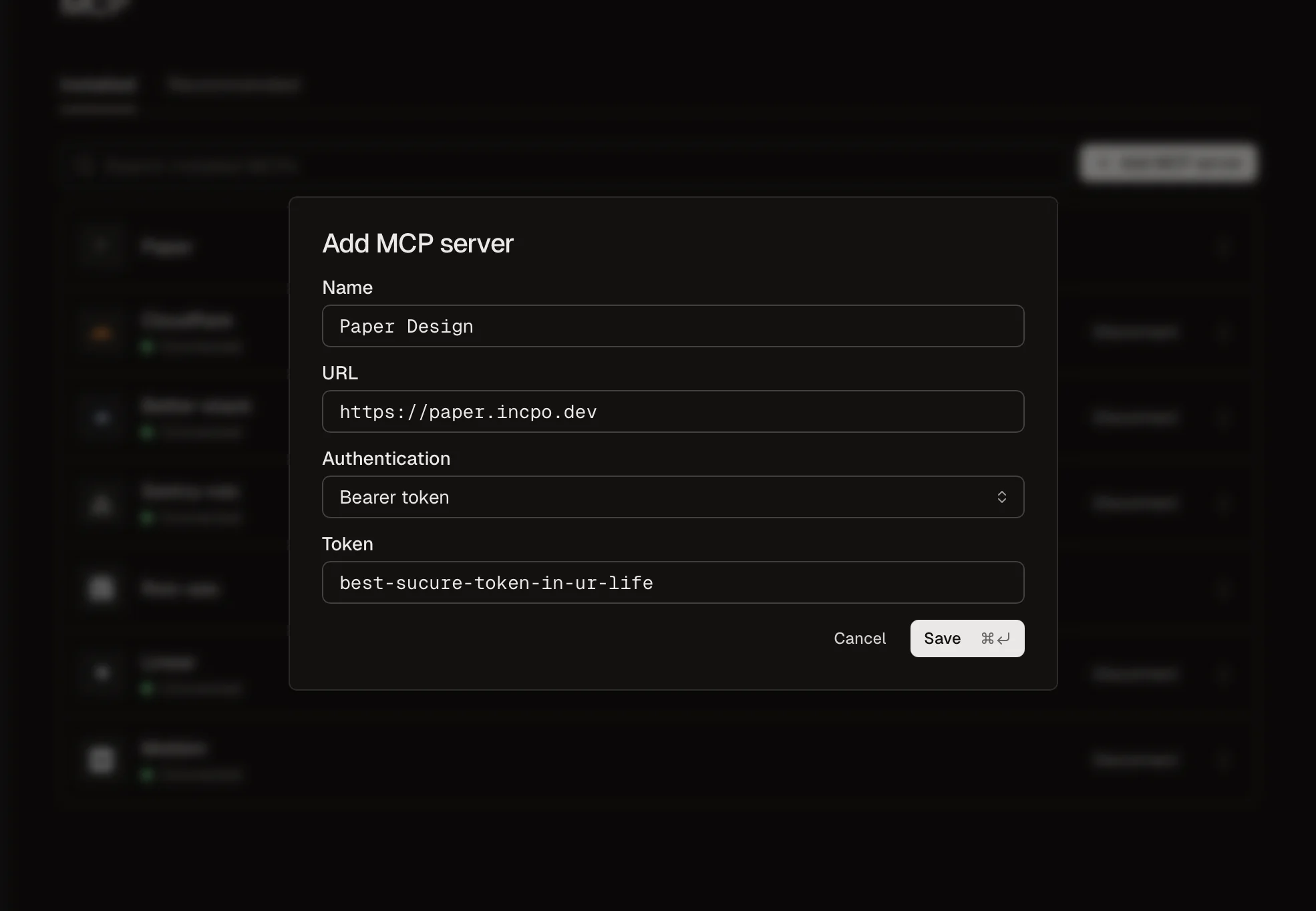
To copy the token without printing it, run pbcopy < ~/.paper/mcp-token and paste it into the Token field. Don't paste it into a chat or commit it. Conductor routes the server into every cloud workspace through its MCP proxy, so a new workspace gets Paper's tools with no extra setup.
Know the limits
- Your Mac has to be awake, and Paper has to be open. Otherwise every request returns
502. - Anyone with the token can read and edit the files you have open in Paper. To revoke the token, write a new one to
~/.paper/mcp-token, restart the proxy withlaunchctl kickstart -k gui/$(id -u)/<label>, and paste the new token into Conductor.
Happy designing! ✌️